Samsung Galaxy 3 – First Impression
Got my hands on the Samsung Galaxy 3, model number GT-5801, the latest Android Smartphone from the Samsung stables. My friend bought it for Rs. 12000, or roughly 260$. A very good pricing for the features and the punch it packs, as I found later.
The box contains a very small user manual, a data cable, handsfree earpieces, the Kies(a PC suite from Samsung, with a very user friendly interface) software cd, and of course, the phone with battery. Also bundled along with the box is a 2GB microSD card and a microSD to SD card adapter. 2GB seems quite less for a Smartphone but, its included free, so can’t complain.
The Phone
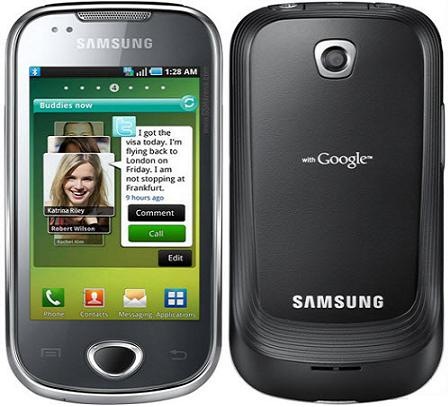
The first impression of the built quality was, oh!! its quite sturdy and though not heavy built, its doesn’t feel cheap. Not much plastic feel to it. Though the looks are average,a nice shiny rim running all around compensates for that. The front is quite a fingerprint magnet though, and I caught myself, cleaning it on my shirt sleeves after 5 minutes of use.
The front contains three buttons, the menu key if you may call it that, the back key and the options key. No other physical key anywhere around it. It all goes touch from here. The top houses the 3.5 mm audio output port, a proprietary usb port for data transfer and charging, and the power switch. Bottom has the microphone hole. And the back has the camera(no flash sadly). Oh! and the back also displays “withGoogle” in bold(indicating that the open source Android runs in it), which manages to be not to intrusive, but give the phone, a classy looks!! I was awed by it.
On starting
We are welcomed by the Touch Wiz 3.0 user interface, the popular user interface by Samsung, modified to work with Android 2.1(Eclair). The OS is upgradable to 2.2(Froyo) and the firmware update is already available through Kies. Though I would have preferred Samsung to upgrade it in the factory itself, to spare the users of the hassle. The UI has a feature of creating up to 7 home screens, where we can add widgets from Samsung or Android, shoutcuts and change wallpapers as per our choice. The touch is quite responsive, and scrolling between the home screens is quite smooth.The phone comes with only one home screen, configured with widgets for Gmail, Google search, maps, android market, YouTube, Google talk and phone(for making calls) Also the bottom bar features shortcut for phone function, contacts, messaging and the home screen. The 667mhz processor, does its job quite good. But no extra applications were running in the background and the phone was just out of the box, so will have to wait for a week or so to know more in this regards. Pressing the menu button(center) brings up the widgets and applications installed in the phone.
(Photo Courtesy: www.items-review.com)
Features which I managed to Check
(The phone was for a limited time in my hands so please find a very brief review, or just a preview. Detailed review slated to come in some days.)
Never used a Smartphone before, so wasn’t sure what I was looking at. Took me some time finding out what exactly I was doing. But I know what I want in a Smartphone, and I felt that this one had the potential to seduce me once I had a quick look. The very first widget I saw was allshare, the DLNA app. DLNA is something by which all the future multimedia device are touted to communicate. Basically, if you have a DLNA certified devices, media contents can be shared across them without the need of the complicated transfer routines and cables. Just wifi will do. But this is just the basic explanation. To know more check out here. No other DLNA device at hand, so can’t test. But good to know that its included.
The phone comes with a built in accelerometer, to rotate the display when held in landscape mode. But it comes deactivated and has to be activated from the display settings of the phone. Works quite well when typing a text message. Will have to check out which other applications work with the accelerometer.
Video playback is in landscape mode by default, and the phone speakers are loud and clear if we are watching the video in a group. But the sound quality suggest that they might star jarring after some use. There is an option to select virtual 5.1 surround sound which works when earpieces are connected. Not much difference in sound quality when it is activated. Though the resolution of the screen is less for its size(240 x 400 pixels, 3.2 inches), it does a respectable job of displaying the video. The Music player is good but didn’t get enough time to check if the device had a customizable equalizer. But will surely get to that in the next detailed review very soon.
Sporting a 3.15 MP primary camera, but no secondary camera, this phone lacks that extra edge for use as a true 3G phone. The primary camera is good, and reproduces the images with good clarity in normal light. But the low resolution screen doesn’t seem to do justice to the photos displayed. When transferred to a computer, we can see better results from the camera. Video recording is @15fps which is just average. Will check for any tweaks to get the right quality later. Same for the camera. In the picture gallery, the photos can be zoomed in or out using the multitouch actions like pinching and moving the fingers in opposite direction, just like in iPhone.
The mobile sports a bluetooth, GPRS, 3G, Wifi and EDGE connectivity. I was able to detect my home wireless router quite easily and connecting to it was a breeze. But my internet was down, so even that front has to wait for inclusion in the review.
Android Eclair 2.1 doesn’t support installing applications on the memory card, but Froyo 2.2 does, so a firmware upgrade should solve any memory hogging problems this phone might face. Though there were many apps installed, I was disappointed to find no games preinstalled.
Samsung claims a battery life of 15.5 hours talktime for 2G, and 7.25 hours talktime for 3G, which is quite respectable.
Given that I had less time at my hand, or less time with my hands on it and no internet connectivity at the time of use, this was as much I could make out of the phone. I will strive to get a good look at the features in some days time. Till then check out the specifications as published by gsmarena.
|
General
|
2G Network GSM 850 / 900 / 1800 / 1900 3G Network HSDPA 900 / 2100 |
|
Size |
Dimensions 113.5 x 55 x 12.6 mm Weight 113 g |
| Display |
Type TFT capacitive touchscreen, 16M colors Size 240 x 400 pixels, 3.2 inches – Touch Wiz 3.0 |
| Sound |
Alert types Vibration; MP3, WAV ringtones Speakerphone Yes – 3.5 mm audio jack |
| Memory |
Phonebook Practically unlimited entries and fields, Photocall Call records Practically unlimited Internal 512MB ROM, 256MB RAM Card slot microSD, up to 32GB |
| Data |
GPRS Class 10 (4+1/3+2 slots), 32 – 48 kbps EDGE Class 10, 236.8 kbps 3G HSDPA, 3.6 Mbps WLAN Wi-Fi 802.11 b/g/n Bluetooth Yes, v3.0 with A2DP USB Yes, v2.0 microUSB |
| Camera |
Primary 3.15 MP, 2048×1536 pixels, autofocus Features Geo-tagging, face and smile detection Video Yes, QVGA@15fps Secondary No |
| Features |
OS Android OS, v2.1 (Eclair), upgradable to v2.2 CPU 667 MHz processor Messaging SMS(threaded view), MMS, Email, Push Mail, IM Browser HTML Radio Stereo FM radio with RDS Games (None installed, Download from Android market) Colors GPS Yes, with A-GPS support Java Via third party application – Orange Application Shop |
| Battery |
Standard battery, Li-Ion 1500 mAh Stand-by Up to 620 h (2G) / Up to 480 h (3G) Talk time Up to 15 h 30 min (2G) / Up to 7 h 15 min (3G) |
hi can u pl tell me how to use the kies. the language in my kies cd is ?korean.
changing to english changes only the license agreement.
the samsung galaxy 3 is the coolest phone for the money!
Hi. Do you mean that the Froyo 2.2 update was available for the Galaxy 3 when you used it? Please reply, as I’m thinking of buying the phone..
I am planning to buy this phone.Is it possible to upgrade the OS to android 2.2 in Galaxy 3?
hi arya. download the latest version of kies from samsung india website. it will work fine . but no apps for android on samsung app store. check the android marketplace on your phone in the menu for best apps for your phone.
hi abhijeet and jagethesan. this phone is supposed to get froyo 2.2 upgrade but the upgrade is not yet published by samsung.everyone is expecting it by mid nov. It was my mistake that i said that the upgrade is available as my friend had informed it. It was an upgrade dor kies and not android.
this is a very good phone for its price.
I am sorry to everyone that i didn’t post a detailed review since i didn’t get mixh time with that phone after this post. Second thing is that i just cant get my hands off SAMSUNG WAVE !! Yes i bought that phone and am plannong a review of that too.
Hi…
Upgradable to Android froyo is available in Samsung 3…
I had enquired it in Samsung customer care and also samsung centres in Bangalore…
But the thing is, just wait till Nov end…
Hi Guys,
Bought this phone last Saturday… mind blowing phone and mind blowing applications… man really loving it…but it does not have any sign on any icon like it was in my last Nokia 5230 that apps are running in backgorund, so i m never sure that aplication is running in background or not…
But will tell u all some amazing features of this phone(those who are planning to buy it):
1. net is a must … so that you can use this phone at its full by GPS, android apps, samsung apps, and ur gmail accs
2. weather forcast feature
3. SMS will be saved by name of contacts e.g. if u have a contact named A whatever sms u receive from A or send to A will be saved under his name.
4. Swype feature is there to type in keypad, where just y swiping ur fingers over keypad u can type the words.. really GR8.
5. GPS feature will not only let u find other places and ur location but its navigation feature will also tell you route from where to where you want to go.
6. Although th e camera is 3.15 MP and lacks flash but still it allows to let you click ur picks in so many mode like panoroma, smile, add me(u can add two separate frmae in same pic).. these are just to name. U can also change the scene mode to get any kind pic like night, fall, dawn, sunset, beach, firework etc. But this phone does not have much feature when u r using it for video recoding.
7. Layer technology is there but i m still learning how to use this.
8. thinkfreeoffice allows you to save ur word doc excel and powerpoint files in the phone and access it
9. Market – through this u can download all the android apps though android market either free or paid ones.
Rest of the features u can see after buying the phone…. So buy it and enjoy it if ur budget limits u under 12000 and u want a smart phone.
I am owner of SAMSUNG GALAXY 3 APOLLO GT-I5801. I upgraded my device to Android 2.2 Froyo by authorised service centre 2 times. But each time, my Android internet browser as well as any other browser like Skyfire, Opera Mobile, Dolphin and Miren are unable to show plugin content even after enabling plugin content in settings. For example, ‘www.cavernsofblood.com’, ‘www.millaj.com’ could not be viewed with animated content after Froyo upgrade. With Android 2.1 Eclair, these websites were easily viewed with animated content after enabling plugin content in settings in Android browser. Most of the websites and links in them now could not be opened after froyo upgrade. All this was perfectly working in Android 2.1 Eclair. In Froyo, while browsing internet websites, a blue coloured cube with question mark sign appears in place of plugin content which is annoying. Kindly help me by providing a proper solution.
I think you need o visit android forums to solve this…check this link
http://androidforums.com/samsung-galaxy-apollo-3/
The problems of thread are already known to me as an advanced user. So was not useful. Kindly provide solution to my problem.
Sorry boss, but I have no idea what the solution to your specific problem is. thats why i gave you the link…this is a professional forum and i am sure that if you ask them question, they will respond.
Please do not publish the same comments multiple times.
Try updating the firmware through Kies or through update option in the phone settings. You will have to search it yourselves since you are an advance level user.
Service centers are known to not have the correct firmwares….so upgrade yourself.